 Remove Background Noise
How to remove wind noise from a video
Why wind ruins phone audio, how to prevent it while filming, and how to reduce wind rumble in a finished video with an AI preview.
Updated 2026-11-03 · 3 min read
Short answer: wind noise is easiest to avoid at the microphone and hard to fully repair afterwards. If the voice is still audible over the wind, AI noise reduction can lower the rumble and keep your original picture. If the wind overloads the microphone, no tool can bring the voice back.
Why wind is hard to remove
Wind is not a sound in the air; it is turbulence hitting the microphone. It produces loud, low-frequency rumble that changes from moment to moment, which overlaps with the range of a human voice. A strong gust can also push the microphone into clipping, which destroys the signal underneath.
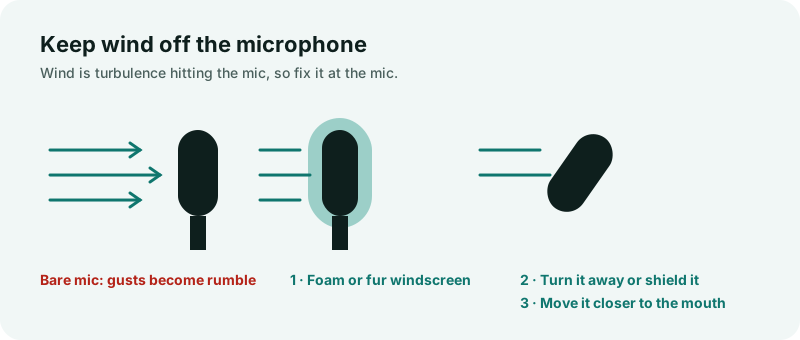
Prevent it while filming
- Turn the microphone away from the wind, or shield it with your body.
- Use a foam or furry windscreen if your microphone or camera supports one.
- Get the microphone closer to the speaker's mouth. A louder voice means less relative wind.
- Record a few seconds of the same scene again in a sheltered spot, so you have a backup.
Reduce it in a finished video
- Choose your video. It must be an MP4 with H.264 video and AAC audio, up to 500 MB and 30 minutes (see supported formats and the iPhone format guide).
- Listen to the free 30-second AI preview. Only the audio is uploaded; the picture stays on your device.
- If the voice sounds clear, process the full recording and download an MP4 with your original picture.
What to expect
- Steady or moderate wind under clearly audible speech usually improves the most.
- Strong gusts can leave a slightly processed sound.
- Gusts that clip the microphone, wind with no speech, and several people talking at once are not repaired.
Because results depend on the recording, judge the preview on your own file before paying. Start with the wind noise remover.
More guides
What kinds of background noise can be reduced under speech, how to record cleaner audio, and how to clean an existing recording.
GuideWhy an iPhone video may be rejected by the noise remover, how to switch the camera to H.264, and how to convert clips you already recorded.